Templates
Templates
Build an email from blocks without writing HTML, or write the HTML yourself. The server compiles both, so the preview you approve is the email that arrives.
app.sendheron.com/templates
What it does
Email copy changes more often than the code that sends it, and the person who notices the typo is rarely the person who can deploy. Templates keep the two apart: the wording lives in SendHeron and your application passes the variables, so fixing a typo is not a release.
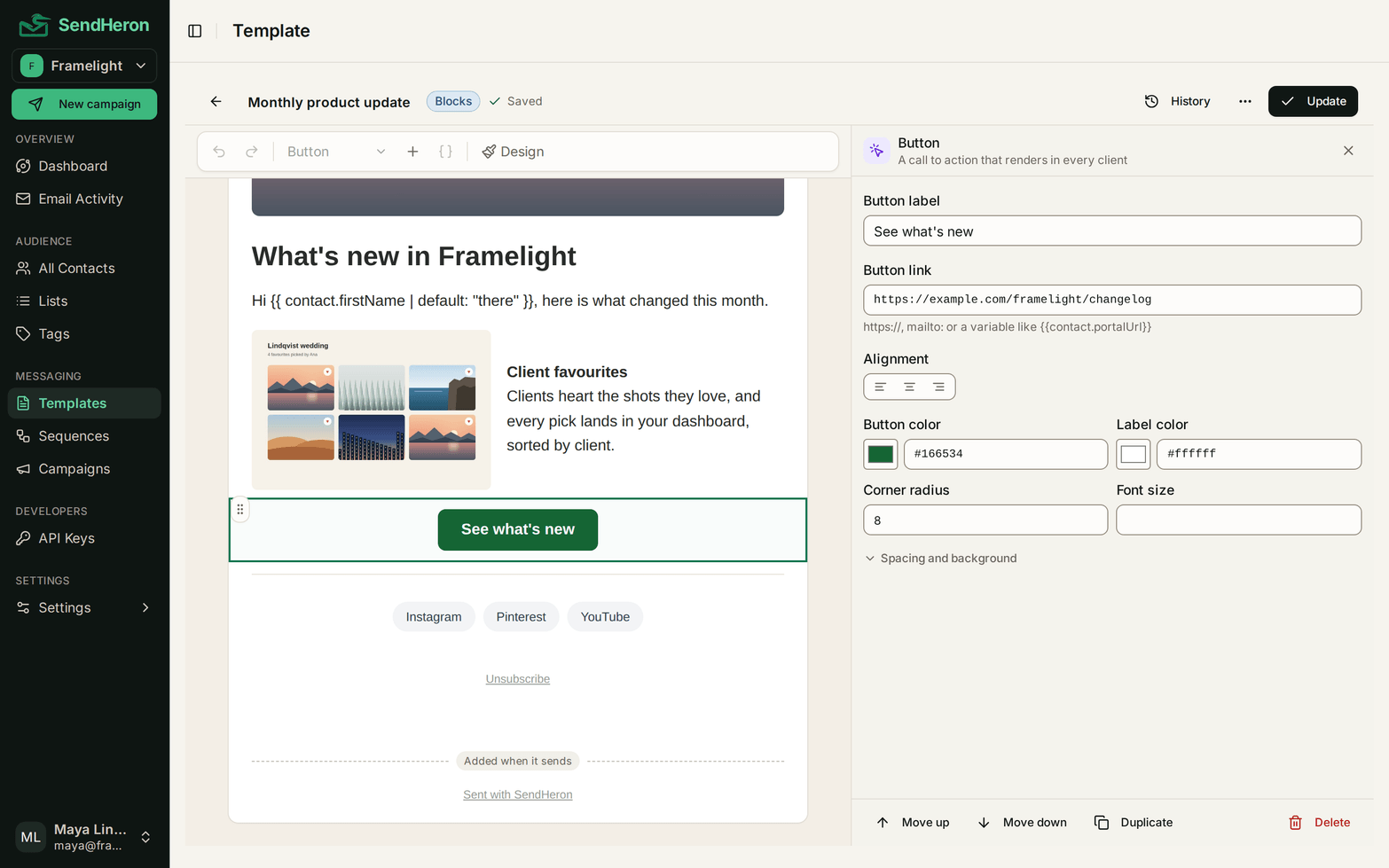
The wording does not have to be HTML either. Start a template with blocks and you write in the email itself. Type where the words go, press / to add a heading, a button, an image or any other block where the cursor is, and select any block to open its settings beside the email. A handle drags a block to a new place, and undo and redo cover every change. This is not a separate product bolted on beside the real one: it is the same template object, with the same variables, usable from the same places.
If you would rather write the markup, that mode is untouched, and a block template can be converted to editable HTML whenever you want to take the wheel. The conversion hands you the exact HTML the preview was showing, so it is a door out rather than a rewrite. It only goes one way, which is the honest way to build an escape hatch.
Because substitution happens at send time, the data you pass is the data that renders. There is no sync step and no stale copy of a customer's name sitting in an email platform going out of date.
The subject and the preview text sit at the top of the email, above the blocks. Preview text is the line an inbox shows after the subject. Keep it to 40 to 130 characters, add to the subject rather than repeat it, and give merge tags a default, as in {{ contact.firstName | default: "friend" }}, so a contact with no first name never sees a blank.
app.sendheron.com/campaigns
| Block | What it puts in the email |
|---|---|
| Heading | A section title, at one of three levels. |
| Text | A rich text paragraph, with links and variables. |
| Button | A call to action, compiled as a nested table so Outlook renders it as a button. |
| Image | A hosted image, optionally linked. |
| Image and text | One image beside one column of text. The only side by side layout here. |
| Divider | A horizontal rule, in a chosen thickness and line style. |
| Spacer | Vertical space, for when the padding controls are not the right tool. |
| List | A bulleted or numbered list. |
| Quote | An indented pull quote against a colored rule. |
| Social links | A row of links to your profiles. |
| Custom HTML | Your own markup, for the one thing the other blocks do not cover. |
| Unsubscribe | The opt out, in your own wording, placed where you want it. |
Every block carries its own alignment, color, size and spacing controls, and each of those is bounded. The editor offers the range the server accepts, so the two cannot disagree.
The shape of it
- 01
Pick how you work
A new template asks first: stack blocks, or write raw HTML. Both produce one ordinary template.
- 02
Write in the email
Type in the email itself, press / for a block, select a block for its settings, and drag to reorder.
- 03
The server compiles it
The preview is built by the same code that sends, with sample variables and the unsubscribe footer already in place.
- 04
Send it from anywhere
The result is ordinary email HTML, so sequences, campaigns and the API consume it unchanged.
How it works
A block template is a document: an ordered list of blocks plus a set of document-wide design settings. The settings cover the canvas color behind the email, the content background, the content width, the corner radius, the text and link colors, and the font. Each block then carries its own alignment, colors, sizes and spacing.
Every one of those controls is bounded, and the server enforces the same bounds the editor offers. A value outside its range is rejected with a named issue rather than quietly clamped, because silently repairing input teaches the editor a contract the send pipeline does not honor. The font picker is a short list of email-safe stacks on purpose: web fonts fail silently in most mail clients, so offering them would be offering a coin flip.
The editor validates against the server as you type. When something is wrong, an empty button link or an image with no source, the response names the exact block, the editor marks it, and saving is blocked until it is fixed. You are never one careless save away from a broken template, which matters here because a saved template is immediately live for every path that sends it. Saving a template is explicit for the same reason: there is no autosave to surprise you.
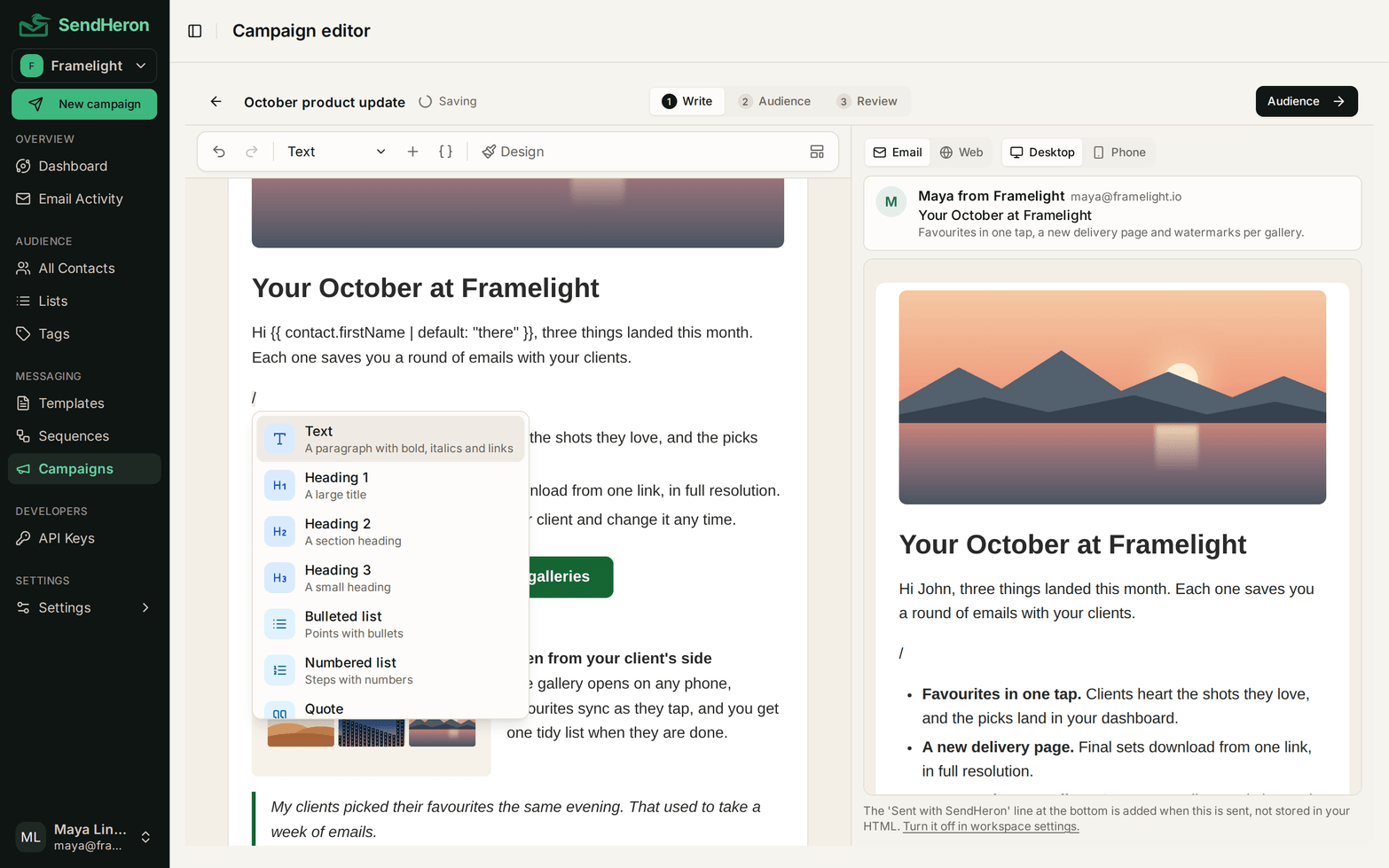
Campaigns use the same editor. A campaign holds its own email, written in place, or starts from a template built with blocks, which is copied in, so editing one never changes the other. A campaign draft saves itself as you type, because nothing sends it until you review it.
Every save keeps the one before it. A template holds its last 50 saved states and any of them can be put back in a click. Restoring appends rather than rewinds, so the state you replaced stays in the history and an undo can itself be undone. It is worth saying plainly because of what it does to how people work rather than what it adds to a feature list: you edit a live template far more freely once you know nothing you do to it is final. Version history is dashboard work, not part of the REST API.
When you save, the document compiles to HTML on the server, and that HTML is what the rest of the product already understands. Nothing downstream learns that blocks exist. Templates stay full create, read, update and delete over the API behind the templates:read and templates:write scopes, and that split is the useful part: a key that can send email does not automatically get to rewrite what the email says. The same object is what a send step in a sequence points at, so changing the copy changes it everywhere it is used.
curl -X POST https://api.sendheron.com/api/v1/emails/send-template \
  -H "Authorization: Bearer $SENDHERON_API_KEY" \
  -H "Content-Type: application/json" \
  -d '{
    "templateId": "$TEMPLATE_ID",
    "to": "[email protected]",
    "variables": { "firstName": "Sam", "plan": "Growth" }
  }'

# Requires a key holding emails:send.- Twelve block types, added from the / menu and reordered by drag or with Move up and Move down
- Subject and preview text at the top of the email
- Email and Web previews at desktop and phone width, rendered by the server
- One editor for templates and campaigns
- Document-wide design settings: colors, content width, corner radius and an email-safe font
- Live server-side validation that names the block that is wrong and blocks the save
- The last 50 saved states kept, with one-click restore that is itself a save
- Image upload to permanent hosting, with a searchable library to reuse past uploads
- Variables in text, in link destinations, and as an image source
- One-way conversion from blocks to editable HTML
- Variable substitution from data you pass at send time
- Full create, read, update, delete over the API
Related: using the same template from a sequence step, how marketing and transactional mail differ
What makes it different, honestly
The preview is not a second implementation guessing at the first. It is composed by the same engine that composes a real send, in the same order: sample variables filled in, the unsubscribe footer added when one is owed, the workspace badge applied if you have it enabled. Most builders render your design in a browser and then send something assembled elsewhere, and the gap between those two is where the surprise lives. Here there is no gap to be wrong about.
That preview sits beside the email while you write: Email or Web, at desktop or phone width. The Email view opens with the inbox line, the sender, the subject and the preview text after it.
The compiled output is deliberately boring. Buttons are nested tables, because a styled anchor degrades to a bare link in Outlook. The two-column block pins its width with an Outlook conditional table. Dividers are a border on a div rather than an hr. None of this is visible to you, and that is the point: the interesting choices were made once, in one file, instead of being rediscovered by every person who ever builds an email here.
Honest about the shape of it. This is a vertical stack of blocks, not a drag-anywhere canvas, and image beside text is the only side by side layout offered. That is a decision rather than a gap: multi-column email is exactly where rendering across clients falls apart, and one column that survives Outlook is worth more than four that do not. There is no starter gallery yet, no A/B testing, and no per-client rendering screenshots. If your existing templates are HTML they are portable, which is why migrating them in is one of the easier parts of a move. Sequences are the hard part, and we say so on that page rather than here.
Images that keep resolving
An email with a broken image is worse than an email with no image, and email is the one medium where that failure arrives years later. Upload a PNG, JPEG, GIF or WebP up to 5 MB and it is published to a permanent public URL on media.sendheron.com. The bytes are checked server-side rather than the file name trusted, so a renamed file does not sneak past, and SVG is not accepted at all: most clients will not render it, and it can carry script.
Published images are never deleted. That is a policy, not an accident of implementation, because a message you sent two years ago is still sitting in an inbox pointing at that URL. Past uploads collect in a searchable library, so the second template that needs your logo reuses the first one's copy instead of creating another.
Variables work in more places than the text. A merge tag can fill a link destination or stand in as the image source, so a template can point each recipient at a different asset without becoming a different template.
Blueprints from the template gallery
Questions
Templates, in detail
Free trial
Templates, live on every plan
Everything on this page ships today, on every tier. Start a trial and use it on real sending.
7-day free trial. Pick a plan, add a card, cancel before the trial ends and you won't be charged. 1,000 contacts and 5,000 sends during the trial.