Sequences
Visual sequence builder
Triggers, delays, and conditions that branch on tags or contact properties, with AND and OR rules. One flow can cover every path through a journey.
app.sendheron.com/sequences
What it does
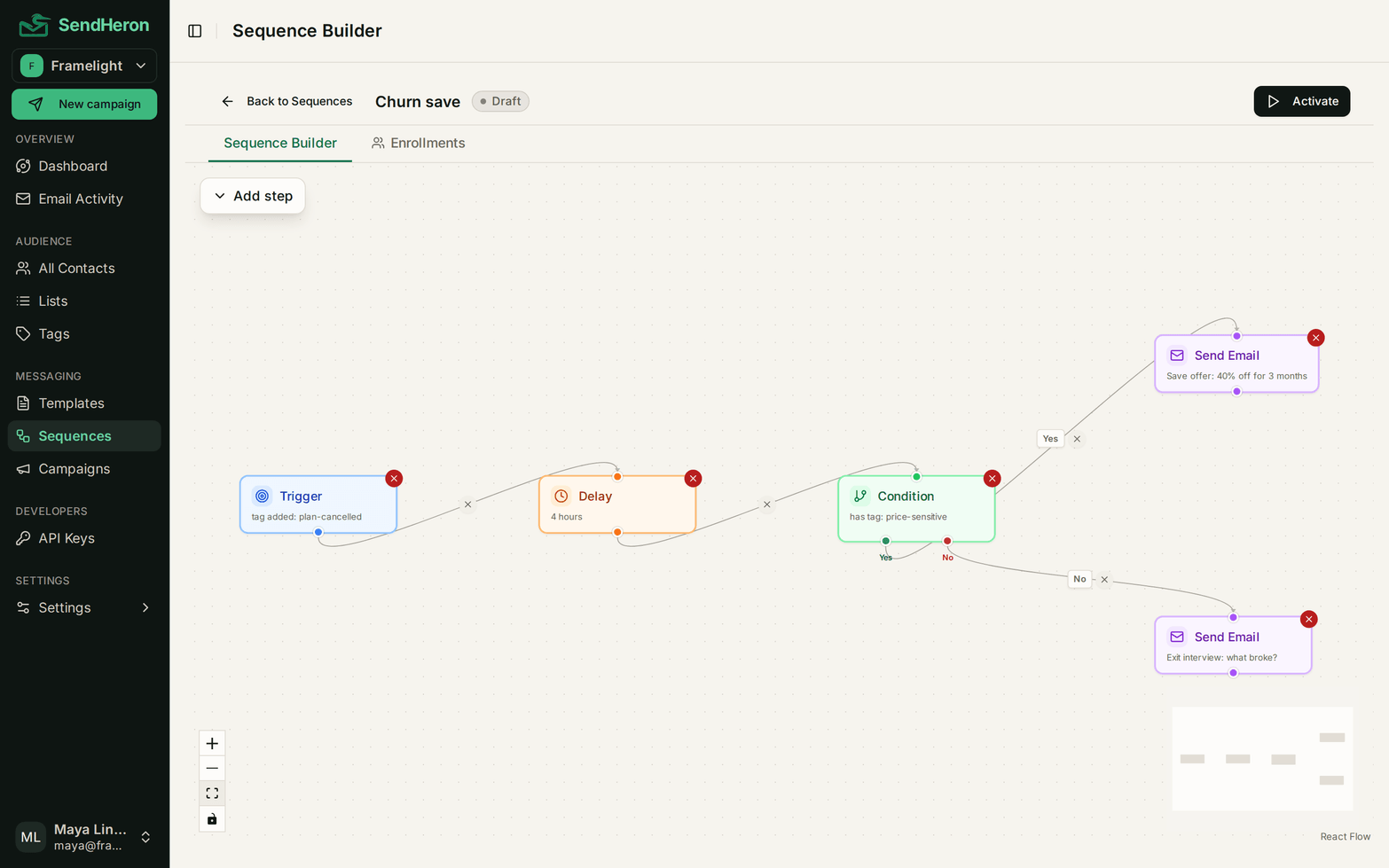
A sequence is a graph, not a list. You start from a trigger, wait, check something about the contact, and send different email down each branch. The same flow handles the person who upgraded on day two and the one who went quiet, without you maintaining two copies of it.
Four kinds of step make up a canvas. A trigger starts the run. A delay holds the contact for minutes, hours or days. A condition branches on something you already know about them. A send step puts an email in front of them. Branches nest, so a condition inside a branch is just another condition, and one flow can cover several outcomes instead of being duplicated per outcome.
The churn-save flow above is the shortest real example we can give. A tag lands on the contact when a cancellation starts, four hours pass, and then the flow asks why they cancelled and answers each reason with a different email. That is one sequence doing the work of three campaigns, and it is running in production right now.
The shape of it
- 01
Trigger
A tag lands on a contact and the run starts. Your backend picks the moment.
- 02
Delay
Hold for minutes, hours or days before the next step does anything.
- 03
Condition
Branch on tags, properties or tracked events, combined with AND and OR.
- 04
Send
A different email down each branch, each one reporting its own numbers.
How it works
The trigger is the part most tools get backwards. Here a sequence starts when a tag is added to a contact, which puts the decision in your backend rather than in a filter language you have to trust. Your application already knows when a trial started, when a payment failed, and when somebody stopped logging in. One call attaches the tag, and the sequence takes it from there.
Conditions read three things: the tags on a contact, the custom properties you set on them, and the events you have tracked against them. Properties are arbitrary JSON, so anything your product knows can become a branch. A single condition combines rules with AND and OR, which is what stops a two-part question from turning into four separate sequences.
Delays are measured in minutes, hours or days, and they carry more weight than they look like they do. The four-hour wait in our own churn-save flow exists so the email does not arrive while somebody is still sitting in the cancellation screen.
- Trigger on a tag being added, so your backend decides when a journey starts
- Delays measured in minutes, hours, or days between steps
- Conditions on tags, contact properties, and tracked events
- AND and OR rules inside a single condition
- Per-step analytics, so you can see which branch is doing the work
What makes it different, honestly
Every tier includes unlimited sequences. That is a pricing decision more than a feature: our cost is driven by how much mail goes out, not by how many flows sit in a database, so charging you for building more automation would be charging for nothing.
Per-step analytics is the other half of it. Each node reports its own sends, opens and clicks, so a branch that never fires is visible instead of being averaged into a sequence total that looks healthy.
What this is not: a general workflow automation tool. It sends email, it waits, and it branches. If you need it to call a webhook mid-flow or move a record in a CRM, that is not what this is. Migrating an existing flow also means rebuilding it, because no two tools model branching the same way. We will help you do it during onboarding rather than pretend an importer can preserve the logic.
Sequences to build with it
Questions
Visual sequence builder, in detail
Free trial
Visual sequence builder, live on every plan
Everything on this page ships today, on every tier. Start a trial and use it on real sending.
7-day free trial. Pick a plan, add a card, cancel before the trial ends and you won't be charged. 1,000 contacts and 5,000 sends during the trial.