AI setup, human approval
Email automation that sets itself up. You approve every word.
Paste your website URL. SendHeron proposes the tag schema your product should emit, then drafts a lifecycle suite in your brand voice: welcome, trial, win-back, cancel-save. You activate what you want, one sequence at a time.
7-day free trial. Pick a plan, add a card, cancel before the trial ends and you won't be charged. 1,000 contacts and 5,000 sends during the trial.
Or read the API reference, 70 documented endpoints
Built by the team behind PostFast, which runs its own lifecycle email on SendHeron in production.

app.sendheron.com/sequences
€19
a month for 10,000 contacts
50K
emails a month on Starter
70
documented REST API endpoints
€0
for unsubscribed and bounced contacts
Prices include VAT where it applies. 7-day free trial on every plan.
How the setup runs
From a website URL to a lifecycle suite you can read
It runs once per project. Everything it produces is a draft: no sequence activates, and nothing sends, until you switch it on yourself.
- 01
Paste your URL
Your website, plus two questions about your product. That is the whole input.
- 02
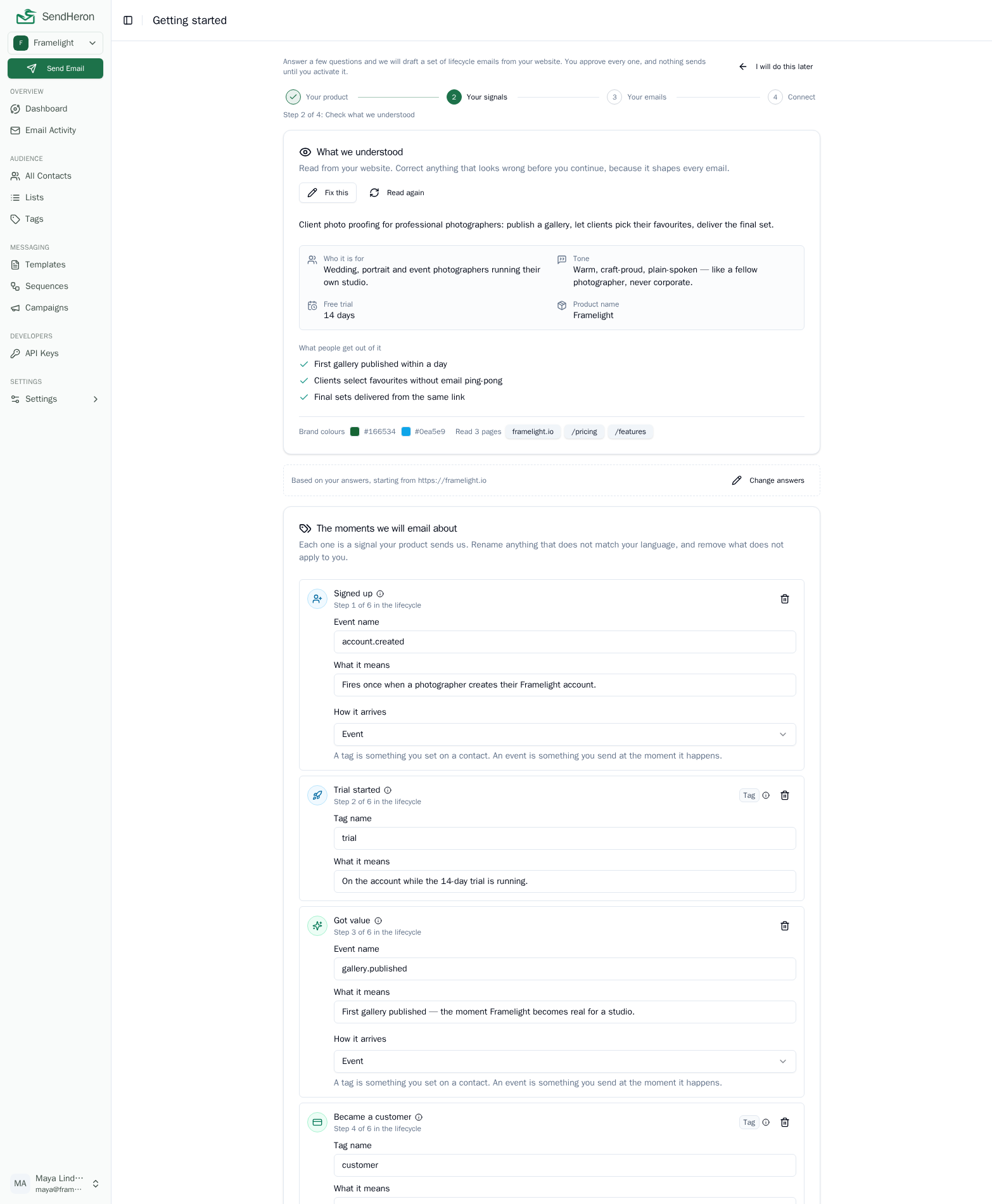
Approve the schema
We read your site and propose the tags and events your product should emit. You edit that list and approve it.
- 03
Read the drafts
The suite, drafted: sequences with real triggers, delays and branching, and finished emails in your brand voice.
- 04
Activate what you want
Review each sequence and switch on only the ones you want. Snippets show your developer how to wire every signal.
If your site cannot be read, a short description of your product works instead. Everything after that first step is identical.
app.sendheron.com/getting-started
curl -X POST \
  https://api.sendheron.com/api/v1/contacts/$CONTACT_ID/events \
  -H "Authorization: Bearer $SENDHERON_API_KEY" \
  -H "Content-Type: application/json" \
  -d '{"name": "trial_started"}'

# 201. The signal is recorded, and any sequence the
# setup drafted against trial_started has just enrolled this contact.
Proof
It already runs a real product's lifecycle email
SendHeron sends every lifecycle email for PostFast: trial activation, win-back, churn save, and dunning.
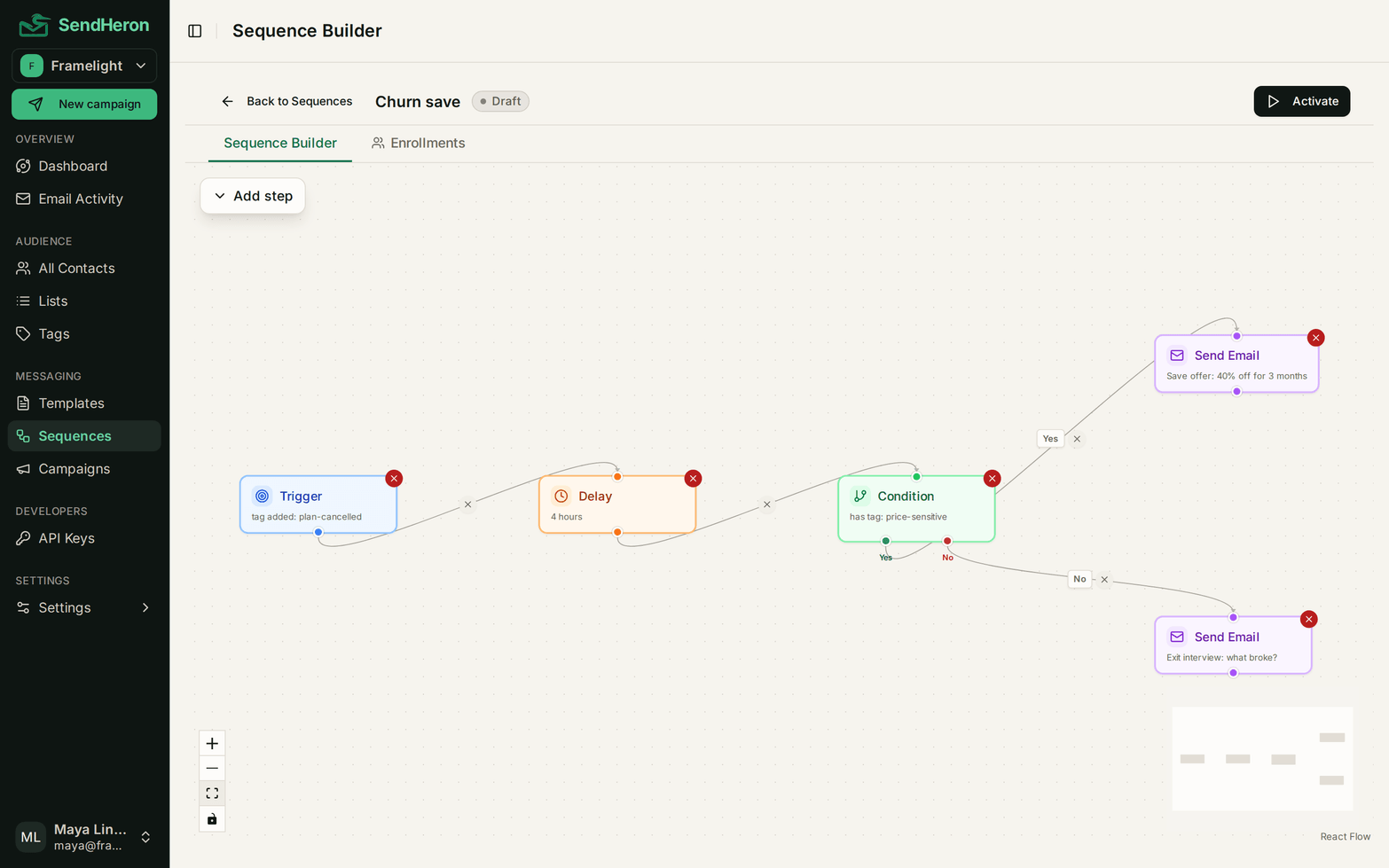
Live churn-save sequence, production
- 01
Trigger
Our backend adds the tag cancel-pending the moment a cancellation starts.
- 02
Delay
Four hours. Long enough that the email does not arrive mid-decision.
- 03
Condition
Branch on why they cancelled: too expensive, not using it, or neither.
- 04
Send
A different email down each branch, answering the reason they gave.
That is the flow in the screenshot above, running against real cancellations. One sequence covers three outcomes, which is the whole argument for branching instead of four separate campaigns.
What you get
Everything the lifecycle needs, nothing it doesn't
Visual sequence builder
Triggers, delays, and conditions that branch on tags or contact properties, with AND and OR rules. One flow can cover every path through a journey.
learn moreTags and segments
Tag a contact from your own backend and a sequence starts. Segments are just rules over tags and properties, so there is no separate list to keep in sync.
learn moreTemplates
Build an email from blocks without writing HTML, or write the HTML yourself. The server compiles both, so the preview you approve is the email that arrives.
learn moreTransactional and marketing
Receipts and campaigns from one account, on one sending reputation and one suppression list. A bounce blocks every stream. An unsubscribe blocks marketing only, and only for the brand it was given to.
learn moreREST API
Contacts, tags, lists and segments, sequences, templates, suppressions, sending domains and identities, sends and analytics are all reachable over HTTP, with scoped API keys so a key can read contacts without being able to send.
learn moreEU data residency
An EU company, with your contact data stored in Germany, and a published sub-processor list. What we can prove is on one page, and so is what we cannot.
learn moreScriptable by agents
Scoped tokens and a plain REST surface, so an agent or a cron job can enroll contacts and send email without a browser session.
learn more
Workspaces
Several products, one account, one subscription
A workspace is a whole separate project. Its contacts, tags, sequences, templates, sending domains and API keys belong to it and to nothing else, so a side project can sit next to the main product without either one seeing the other's data.
Each workspace owns
- Contacts
- Tags
- Sequences
- Templates
- Sending domains
- API keys
- Unsubscribes are per project
- Somebody who leaves one product's list is still subscribed to the other. Those are two separate consent relationships and we keep them that way.
- Bounces are account-wide
- A hard-bounced address is suppressed across every workspace you own, so one project's bad list can never burn a sibling project's sending reputation.
The AI setup runs per workspace, once for each project. This is built for founders and teams running several products of their own. It is not an agency tool yet: per-workspace member permissions do not exist, so there is no such thing as a client login. Roles are account-wide, which is the same fact from the other side.

Pricing at 5,000 contacts
What lifecycle email costs at 5,000 contacts, and what it does
Scroll to compare
| Attribute | Customer.ioSendHeron vs Customer.io | LoopsSendHeron vs Loops | Mailchimp | Userlist | Brevo | SendHeron |
|---|---|---|---|---|---|---|
| Monthly at 5,000 contacts, 25,000 emails | $100Essentials, 5,000 profiles | $49Growth, 5,000 subscribers | $100Standard, 2,501 to 5,000 contacts | $149Basic, 10,000 users | €35Starter, 30,000 emails | €19Starter, 10,000 contacts, 50,000 emails |
| Billed on | Peak profiles, objects included | Subscribed contacts | Total audience, unsubscribes included | Users, in steps of 1,000 | Emails per month, contact cap per step | Subscribed contacts only, unsubscribed stored free |
| Builds your suite from your website | AI agent builds campaigns from a prompt, in product | Agent tooling drafts single campaigns | AI drafts content and single campaigns | Done-for-you kits: their team writes the flows | AI drafts subject lines and email copy | Yes, at setup, as drafts you approve |
| Separate projects, one subscription | Two workspaces on Essentials, billed together | Multiple teams, billed separately per team | 5 audiences on Standard, one plan | Separate accounts, each billed separately | Multiple brands on Enterprise only, custom price | Yes, one subscription |
| Sequences included | Included, visual workflow builder | All features on every tier | Up to 200 steps on Standard | Visual workflows on Basic | Automation on Standard, not on Starter | Unlimited, every tier |
| EU data residency | US or EU data center, your choice | US-hosted, no EU option | US-hosted, no EU option | US-hosted | Hosting region not stated | EU company, EU data |
Competitor prices as of October 20, 2026, on monthly billing. Prices change, so check before you decide. The transactional email APIs are compared on the pricing page.
See full pricingQuestions
The things people ask first
Short answers. If yours is not here, the address in the footer reaches a person.
Free trial
Built by the team behind PostFast. SendHeron has sent its lifecycle email since day one.
The sequences on this page are the ones that run our own trial activation, win-back, churn save and dunning. Start a trial and run yours on the same system.
7-day free trial. Pick a plan, add a card, cancel before the trial ends and you won't be charged. 1,000 contacts and 5,000 sends during the trial.