Sending
Transactional and marketing
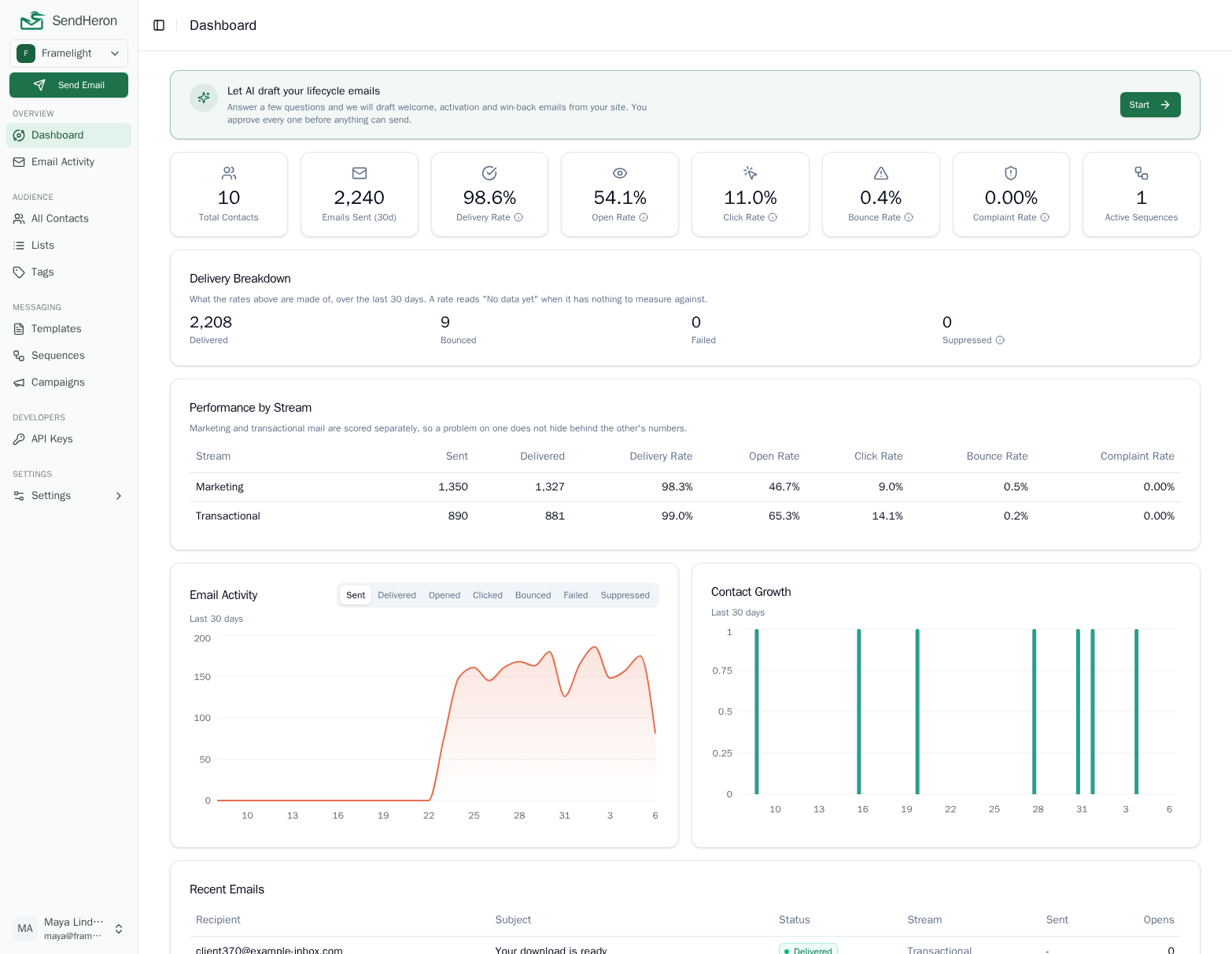
Receipts and campaigns from one account, on one sending reputation and one suppression list. A bounce blocks every stream. An unsubscribe blocks marketing only, and only for the brand it was given to.
app.sendheron.com/dashboard
What it does
Most businesses send two kinds of email and buy them from two companies. One vendor sends the receipts and the password resets, another sends the newsletter, and nobody planned it that way: it happened because every vendor picks a side. The transactional products treat campaigns as an afterthought, the marketing products sell transactional sending as a separate purchase, and you end up with both.
SendHeron runs both streams. Transactional mail goes out through a single endpoint, immediately or at a scheduled time, and accepts an idempotency key so a retry after a timeout cannot send the same receipt twice. Templates carry Handlebars variables, and passing a contact id fills that contact's fields in for you. Campaigns go to a list or a segment. Multi-step sequences run delays and conditions, started by a tag or by a custom event you post from your own backend.
The two streams are reported separately, because blending them hides the thing you need to see. A complaint spike on a campaign is invisible inside a combined number until it has already damaged the reputation that carries your password resets.
The shape of it
- 01
Declare the type
Every template is marketing or transactional. New ones default to marketing.
- 02
The channel sets a floor
A campaign is always marketing, whatever its template claims.
- 03
One list is checked
Both streams read the same suppression entries before anything leaves.
- 04
The tier decides reach
A bounce blocks everything. An opt-out blocks marketing, in one workspace.
How it works
Classification comes from two inputs and the stricter one wins. A template declares its type, and the channel it goes out on sets a floor: a campaign or a bulk send is always marketing, a send through the transactional endpoint is always transactional, and a sequence step follows its template. The floor only ever tightens. Tagging a template transactional and then mailing it as a campaign produces a marketing message, with the unsubscribe link attached, because the alternative would make that flag a switch for stripping unsubscribe links off a mass mailing.
What the classification changes is concrete. Marketing mail gets an unsubscribe link and the List-Unsubscribe headers for RFC 8058 one-click opt-out, and it honours opt-outs. Transactional mail gets neither and ignores them, which is why a customer who left your newsletter can still reset their password. The split extends to tracking and to attachments. Both streams record opens, but only marketing links are rewritten through click tracking: a password-reset link must not depend on a tracking redirect being up, so transactional links leave exactly as you wrote them. The marketing rewrite is signed, meaning the redirect carries a signature over the destination it was built for and will only ever forward a reader to that address, so it cannot be reused as an open redirect for anything else. And only transactional mail may carry file attachments, because attachments on bulk mail are a spam signal that damages the deliverability of everything else you send.
You choose where the unsubscribe link sits and what it says; what you do not choose is where it points. Only a link to our own opt-out endpoint counts as the working opt-out, because that is the one an opt-out can be recorded against. A link that merely reads "unsubscribe" and goes to your own site looks like compliance without being it, so it does not satisfy the requirement and the standard footer is added anyway.
Marketing mail also carries a small "Sent with SendHeron" line, a muted text link below the unsubscribe, never a logo or a banner. It is a workspace setting you can switch off in one click, on any plan, with nothing to ask us for. It never appears on transactional mail, and not because a setting says so: the transactional path never reaches the code that adds it, which is what makes a badge on a password reset structurally impossible rather than merely switched off.
Suppression has two tiers, and the split is the whole design. A hard suppression, meaning a bounce or a spam complaint, blocks every message including transactional, across your whole organization, with no override: continuing to mail an address that hard bounced is what gets a sending domain blocklisted, so it is a deliverability fact rather than a preference. A consent suppression, meaning an unsubscribe, blocks marketing only, and stays inside the one workspace whose brand the recipient actually left. If you run two brands in two workspaces, somebody leaving the first still hears from the second. If an address carries both kinds, the stricter one decides.
# One call per contact, from the job that keeps
# your own database and SendHeron in step.
curl -X PUT https://api.sendheron.com/api/v1/contacts \
  -H "Authorization: Bearer $SENDHERON_KEY" \
  -H "Content-Type: application/json" \
  -d '{"email": "[email protected]",
       "firstName": "Ada",
       "source": "sync"}'

# Matched on email, so re-running a failed batch
# updates Ada rather than creating a second Ada.- Transactional sends, immediate or scheduled, with attachments and an idempotency key
- Handlebars variables, and contact fields filled in automatically
- Campaigns to a static list or a rule-driven segment
- Multi-step sequences with delays and conditions, started by a tag or an event
- One-click unsubscribe headers on marketing mail, per RFC 8058
- A "Sent with SendHeron" line on marketing mail, off in one click on any plan
- Domain authentication, so mail leaves from your own domain
- Warm-up for every new sender, so one careless account cannot hurt everyone's delivery
- Delivery and engagement analytics for both streams, reported separately
What makes it different, honestly
The part a two-vendor setup cannot fix is that the two vendors do not share a suppression list. Somebody unsubscribes in the marketing tool and the transactional tool has never heard of it. Somebody hard bounces in the transactional tool and the next campaign mails the dead address anyway, on a domain reputation both of them are drawing down. You can sync the lists yourself, and the sync is either late or wrong on the day it matters. Here there is one list, checked by both streams, split by the rule that actually matters rather than by which product wrote the row.
What a move involves is worth knowing before you plan one. Contacts are the easy part: upload the old platform's export as it is, and the names and tags it carries come across, anyone who unsubscribed, reported spam or bounced there comes in unsubscribed, and everyone else is checked on the way in. The contact upsert endpoint, which matches on email address and is idempotent, stays the path for a sync job that keeps your own database in step. Sequences are the part that does not move, because no two tools model branching the same way, so they are rebuilt here rather than imported.
Sequences are most of the way to being API-driven and not all of the way. You can replace a sequence's whole graph in one call, its steps and the edges between them, and you can activate or pause it. What you cannot do is create one: there is no POST /sequences, so the sequence itself is still made in the dashboard and everything after that is yours to script. Editing is also restricted to draft and paused sequences, and a step that contacts have already moved through is permanent history rather than something an edit can remove. Attachments are supported on transactional sends only, up to ten files and ten megabytes of decoded content per message from an allowlist of common types, and they pass straight through to the provider without being stored; a send that cannot honour them, a marketing template or a scheduled dispatch, is refused rather than quietly stripped. There are also no outbound event webhooks yet, so if you are arriving from a vendor where you subscribed to delivered and bounced events, there is nowhere to point that today: the analytics endpoints, the per-contact timeline, and reading a single send back by id are what exist instead.
Templates for both streams
Questions
Transactional and marketing, in detail
Free trial
Transactional and marketing, live on every plan
Everything on this page ships today, on every tier. Start a trial and use it on real sending.
7-day free trial. Pick a plan, add a card, cancel before the trial ends and you won't be charged. 1,000 contacts and 5,000 sends during the trial.